


Defines an HTTP listen socket. The connection-pool subelement of the parent http-service element also configures some listen socket settings.
When you first install the Enterprise Server, three http-listener elements exist by default, with id values of admin-listener, http-listener1, and http-listener2. The http-listener2, which is set up with SSL, is disabled by default.
Creating an http listener:
* 0.0.0.0 Means the listener listens on all addresses.
Through asadmin:
asadmin> create-http-listener --listeneraddress 0.0.0.0 --listenerport 8001 –default-virtual-server server SampleListener--port 4848

Through Admin Console:
Step1:
Click on the server-config.
Click on the HTTP Service and click Http Listeners.
Click New to create a new Http Listeners.

Step2:
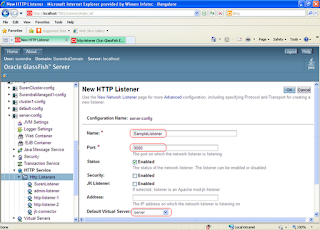
Enter SampleListener for Listener name.
Enter 9000 as port number.
Click Ok to create the HTTP Listener.
When you first install the Enterprise Server, three http-listener elements exist by default, with id values of admin-listener, http-listener1, and http-listener2. The http-listener2, which is set up with SSL, is disabled by default.
Creating an http listener:
* 0.0.0.0 Means the listener listens on all addresses.
Through asadmin:
asadmin> create-http-listener --listeneraddress 0.0.0.0 --listenerport 8001 –default-virtual-server server SampleListener--port 4848

Through Admin Console:
Step1:
Click on the server-config.
Click on the HTTP Service and click Http Listeners.
Click New to create a new Http Listeners.

Step2:
Enter SampleListener for Listener name.
Enter 9000 as port number.
Click Ok to create the HTTP Listener.

