twitter
    !! Tell us what you want to Learn / Know !!
Showing posts with label machine. Show all posts

Proxy Server

  • Proxy servers are used to provide load balancing and failover for a cluster.
  • Proxy servers are the client’s first level of interaction with the cluster
  • Proxy servers give the cluster its single server appearance
  • A proxy server can be either software-based or hardware-based
  • A software-based proxy server may be an internal WebLogic server or a 3rd party application.
  • A hardware-based proxy server is typically a physical load balancer.
The following diagram shows how the request processing happens through proxy server.


Let us see how to create a software-based proxy server.

Navigate to the following location

C:\bea\wlserver_10.3\common\bin

Double click the config.cmd file.

Click Next to Continue.


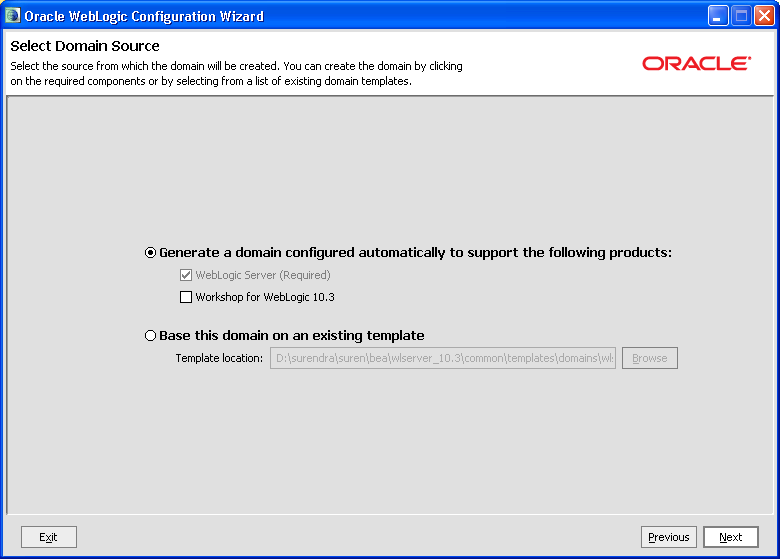
Select the domain source and click Next.

Enter the user name and password for the domain.


Select the start mode and jdk


Select yes and click Next.


Don’t touch anything here, click Next.


Enter the Name for Your Admin Server and click Next.


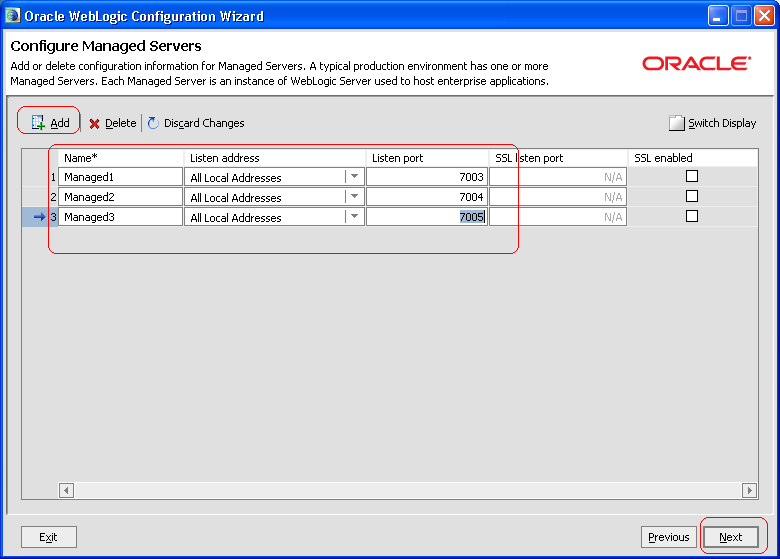
Click on Add to create a Managed Server. Create three managed servers as shown below.

Managed1 – 7003

Managed2 – 7004

Managed3 –7005

Click Next to continue.

Click on Add to create a new Cluster.
Enter Cluster1 for cluster name and click Next.


Assign Managed1 and Managed2 to the cluster and click Next.


Now check the Create HTTP Proxy for cluster Cluster1 option and click Next.


Click on Add to create a Machine.
Enter Machine1 in the name field and click Next.


Assign all servers to Machine1 and click Next continue.


Click Next to continue.


Enter the name and location for your domain and click create.


Components of a domain


Following are the basic Components of a domain
              Admin Server
              Managed Server
              Cluster
              Machine
              Node Manager

Admin Server:
  • One of the weblogic server instances is Admin server which runs using JVM (Java Virtual Machine).
  • Central configuration controller for the entire domain
  • Hosts the Administration console.
  • Enables you to start and stop servers from a central location.
  • Enables you to migrate servers and services within domain
  • Enables you to deploy applications within the domain
Guidelines:
  • There must be exactly one Administration server in domain
  • An Administration server controls only one domain.
  • For production use, we recommend not to hosting application logic or resources on the Administration server.
Managed Server:
  • A running instance that hosts applications and resources needed by those applications- The real work horses in a weblogic domain
  • Each Managed server is independent of all other managed servers in the domain (unless they are in cluster)
  • You can have as many Managed Servers in a domain as you need.
  • Individually Managed Servers are typically added for capacity and application isolation.
Admin server to managed server Interaction:
  • The Administration server stores the master copy of the domain configuration, including the configuration for all managed servers in the domain
  • Each manages server stores a local copy of its configuration.
  • When managed server starts, it connects to the Administration server to synchronize the configuration
  • When configuration is changed, the Administration server sends changed configuration to managed server
Cluster
  • Group of managed servers.
  • Same version managed servers can be clustered but not of different versions.
  • Any number of clusters can be created.

Machine
  • A machine definition is used to associate a computer with the managed server it hosts.
  • Used by Node Manager in restarting a failed Managed server
  • Used by a clustered Managed Server in selecting the best location for storing replicated session data
Node Manager
          Responsible for starting and stopping the managed servers.